Rotate Globe to a Selected Country
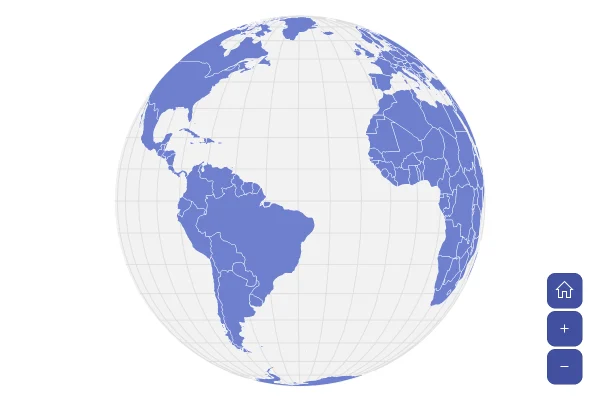
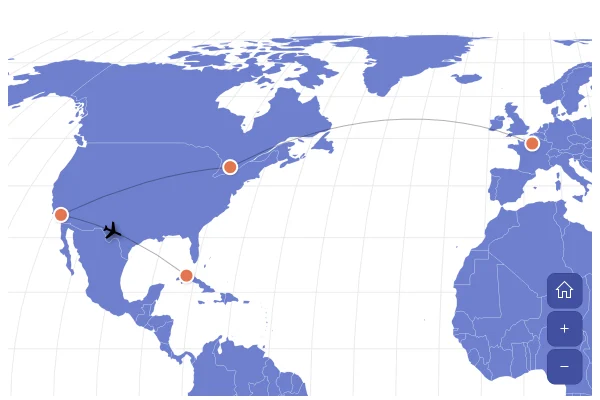
A globe that turns to any country you click, with a plane flying a route around the world through eight cities. Satellite view shows the Earth from space.
About this map
Turning the globe to a place
A globe shows only half the world at a time, so the map brings the place to the reader: on a click, the code animates rotationX and rotationY to the country's center. The same works for a search box or a list of places beside the map. The plane is a point on the route's line, so it follows the route and turns with it.
Good for
- Pickers and search results on a globe
- Round-the-world routes and trips
- Story maps that travel from place to place
Think twice when
- Places far apart: a flat map shows both at once
- Small countries: zoom in as well as turning
- Details of each leg: add a table of the route
For developers
Get the code.
Built with amCharts 5, a JavaScript library. The JavaScript includes your theme and renderer (canvas or SVG); the JSON also follows the changes you make with the controls.
For projects that use npm:
How it reads:
npm install @amcharts/amcharts5 and @amcharts/amcharts5-geodata. See Getting started.
The same chart as a JSON config. Chart Maker reads and writes this format, the library's JSON parser turns it into a chart, and the <am5-chart> element puts it on a page with no code.How it reads:
"type" is the class to create and "settings" what you would pass to its new() in code; "properties" fill in its parts, lists such as series and axes or templates such as columns.template; "refs" holds objects used in more than one place ("#series-0" stands for the one named series-0); a string starting with "@" takes a value from another object, such as "@series.get('fill')".
A complete page. Save it as an .html file and open it in a browser.
Paste this into an AI coding assistant to build the chart from scratch. More in amCharts & AI.
// Create root element
// https://docs.amcharts.com/v5/getting-started/#root-element
var root = am5.Root.new("chartdiv");

// Set themes
// https://docs.amcharts.com/v5/concepts/themes/
root.setThemes([
  am5themes_Animated.new(root),
  am5themes_Responsive.new(root)
]);

// Colors from the theme, so the map follows the theme
var colors = am5.ColorSet.new(root, {});

// Create the map chart
// https://docs.amcharts.com/v5/charts/map-chart/
var chart = root.container.children.push(am5map.MapChart.new(root, {
  // go to the home view once the map is fitted
  autoHome: true,
  panX: "rotateX", // a sideways drag spins the globe...
  panY: "rotateY", // ...and an up-down drag tilts it
  // hold Shift and drag to zoom in on a box
  boxZoom: "shift",
  minZoomLevel: 0.5,                    // can zoom out to half the size of the fitted globe
  projection: am5map.geoOrthographic(), // draws the world as a globe
  // Start (and go home) tilted towards the northern hemisphere, where the route runs
  rotationX: 20,
  rotationY: -35,
  homeRotationX: 20,
  homeRotationY: -35,
  paddingBottom: 20, // 20px of space around the globe on every side
  paddingTop: 20,
  paddingLeft: 20,
  paddingRight: 20,
  // near-black space behind the satellite picture, shown only with it
  background: am5.Rectangle.new(root, {
    fill: am5.color(0x101318),
    fillOpacity: 0
  })
}));

// Zoom control
// https://docs.amcharts.com/v5/charts/map-chart/map-pan-zoom/#zoom-control
var zoomControl = chart.set("zoomControl", am5map.ZoomControl.new(root, {}));

// the home button is hidden by default
zoomControl.homeButton.set("visible", true);

// Create series for background fill
// https://docs.amcharts.com/v5/charts/map-chart/map-polygon-series/#background-polygon
var backgroundSeries = chart.series.push(am5map.MapPolygonSeries.new(root, {}));

backgroundSeries.mapPolygons.template.setAll({
  fill: root.interfaceColors.get("alternativeBackground"), // the theme's contrast color, dark on light
  fillOpacity: 0.05, // at 5%, only a faint tint
  strokeOpacity: 0   // no outline
});

backgroundSeries.data.push({
  geometry: am5map.getGeoRectangle(90, 180, -90, -180) // north, east, south and west edges: the whole world
});

// Satellite view: NASA's picture of the Earth by day, under the grid lines and the countries. Hidden at first
// (visible: false): make it visible for the satellite view
// https://docs.amcharts.com/v5/charts/map-chart/map-raster-series/
var satelliteSeries = chart.series.push(am5map.MapRasterSeries.new(root, {
  visible: false,
  // the map fits the countries, not the whole picture
  affectsBounds: false
}));

// Create graticule series
// https://docs.amcharts.com/v5/charts/map-chart/graticule-series/
var graticuleSeries = chart.series.push(am5map.GraticuleSeries.new(root, {
  step: 10 // a grid line every 10 degrees
}));

graticuleSeries.mapLines.template.setAll({
  stroke: root.interfaceColors.get("alternativeBackground"), // the contrast color...
  strokeOpacity: 0.08 // ...very faint
});

// Create main polygon series for countries
// https://docs.amcharts.com/v5/charts/map-chart/map-polygon-series/
var polygonSeries = chart.series.push(am5map.MapPolygonSeries.new(root, {
  geoJSON: am5geodata_worldLow // the world's countries, low detail
}));

polygonSeries.mapPolygons.template.setAll({
  tooltipText: "{name}", // the country's name, from the map data
  toggleKey: "active",   // a click toggles the country's active state, which turns the globe
  interactive: true,     // reacts to hover and clicks
  strokeWidth: 0.5       // thin borders
});

// Hover and active fill the country in the theme's button colors (over the satellite picture they turn to outlines)
polygonSeries.mapPolygons.template.states.create("hover", {
  fill: root.interfaceColors.get("primaryButtonHover"),
  fillOpacity: 1
});

// The selected country stays highlighted
polygonSeries.mapPolygons.template.states.create("active", {
  fill: root.interfaceColors.get("primaryButtonActive"),
  fillOpacity: 1
});

// Create point series for the cities on the route
// https://docs.amcharts.com/v5/charts/map-chart/map-point-series/
var citySeries = chart.series.push(am5map.MapPointSeries.new(root, {}));

citySeries.bullets.push(function() {
  // Cities can be dragged; the route and the plane follow
  var container = am5.Container.new(root, {
    tooltipText: "{name}",
    draggable: true,
    cursorOverStyle: "move" // a move cursor over the city
  });

  container.events.on("dragged", function(ev) {
    // turn the drop spot into a longitude and latitude and move the city there
    var geoPoint = chart.invert({ x: container.x(), y: container.y() });
    ev.target.dataItem.setAll({
      longitude: geoPoint.longitude,
      latitude: geoPoint.latitude
    });
  });

  // Outer ring
  container.children.push(am5.Circle.new(root, {
    radius: 7,      // 7px...
    fillOpacity: 0, // ...hollow...
    stroke: root.interfaceColors.get("alternativeBackground"), // ...in the theme's contrast color...
    strokeWidth: 2 // ...2px wide
  }));

  // Dot in the middle
  container.children.push(am5.Circle.new(root, {
    radius: 3, // a 3px dot
    fill: root.interfaceColors.get("alternativeBackground")
  }));

  return am5.Bullet.new(root, {
    sprite: container
  });
});

citySeries.data.setAll([
  { id: "london", name: "London", latitude: 51.5074, longitude: -0.1278 },
  { id: "new-york", name: "New York", latitude: 40.7128, longitude: -74.0060 },
  { id: "los-angeles", name: "Los Angeles", latitude: 34.0522, longitude: -118.2437 },
  { id: "tokyo", name: "Tokyo", latitude: 35.6762, longitude: 139.6503 },
  { id: "sydney", name: "Sydney", latitude: -33.8688, longitude: 151.2093 },
  { id: "singapore", name: "Singapore", latitude: 1.3521, longitude: 103.8198 },
  { id: "dubai", name: "Dubai", latitude: 25.2048, longitude: 55.2708 },
  { id: "sao-paulo", name: "Sao Paulo", latitude: -23.5505, longitude: -46.6333 }
]);

// Create line series for the route around the world
// https://docs.amcharts.com/v5/charts/map-chart/map-line-series/
var routeSeries = chart.series.push(am5map.MapLineSeries.new(root, {
  pointSeries: citySeries // the route's pointIds name cities in this series
}));

routeSeries.mapLines.template.setAll({
  stroke: colors.getIndex(10), // the 11th theme color
  strokeOpacity: 0.9,          // nearly opaque
  strokeWidth: 1.5,            // 1.5px wide
  strokeDasharray: [2, 2],     // dotted: 2px dash, 2px gap
  // raised 1,000 km off the globe; the plane flies along at the same height
  altitude: 1000000
});

// The route connects the cities by their ids and ends where it started
routeSeries.data.setAll([
  { id: "route", pointIds: ["london", "new-york", "los-angeles", "tokyo", "sydney", "singapore", "dubai", "sao-paulo", "london"] }
]);

// Create point series for the plane that flies the route
var planeSeries = chart.series.push(am5map.MapPointSeries.new(root, {}));

planeSeries.bullets.push(function() {
  return am5.Bullet.new(root, {
    sprite: am5.Graphics.new(root, {
      svgPath: "M28 15h-6.5L14.9 5.2C14.7 4.8 14.2 4.6 13.8 4.6 12.8 4.6 12.2 5.5 12.5 6.4L15.6 15H8.5c0 0 0 0-1.8-2.2C6.5 12.6 6.3 12.4 6 12.4H5.3C4.8 12.4 4.5 12.8 4.6 13.2L5.9 17.6l-1.3 4.4C4.5 22.4 4.8 22.8 5.3 22.8h.8c.3 0 .5-.2.7-.4C8.5 20.2 8.5 20.2 8.5 20.2h7.1l-3.2 8.6C12.2 29.7 12.8 30.6 13.8 30.6c.5 0 .9-.2 1.2-.6L21.5 20.2h6.5c1.4 0 2.6-1.2 2.6-2.6S29.4 15 28 15z",
      scale: 0.7,       // 70% of the icon's size
      centerX: am5.p50, // the plane's middle...
      centerY: am5.p50, // ...on the route
      fill: root.interfaceColors.get("alternativeBackground"), // the theme's contrast color
      // Shadow on the ground makes the plane look like it's flying above the globe: dark in light and dark mode
      shadowColor: am5.color(0x000000),
      shadowBlur: 4,      // blurred over 4px
      shadowOffsetX: 4,   // 4px to the right...
      shadowOffsetY: 6,   // ...and 6px down
      shadowOpacity: 0.7, // 70% opaque
      // Fly around the world, over and over
      animations: [{
        target: "dataItem",    // animates a value of the data item, not of the sprite
        key: "positionOnLine", // how far along the route, from 0 to 1
        from: 0,
        to: 1,
        duration: 30000, // 30 seconds a lap
        loops: 0         // 0 means forever
      }]
    })
  });
});

// The plane sits on the route and turns to follow it
planeSeries.data.setAll([
  { lineId: "route", positionOnLine: 0, autoRotate: true }
]);

// Rotate the globe to the country that was clicked
var previousPolygon;

polygonSeries.mapPolygons.template.on("active", function(active, target) {
  if (previousPolygon && previousPolygon != target) {
    previousPolygon.set("active", false);
  }
  if (target.get("active")) {
    selectCountry(target.dataItem.get("id"));
  }
  previousPolygon = target;
});

// turn the globe so the country is in the middle
function selectCountry(id) {
  var dataItem = polygonSeries.getDataItemById(id);
  var target = dataItem.get("mapPolygon");
  if (target) {
    var centroid = target.geoCentroid(); // the country's center, as longitude and latitude
    if (centroid) {
      // rotating by minus the country's center brings it to the middle of the globe
      chart.animate({ key: "rotationX", to: -centroid.longitude, duration: 1500, easing: am5.ease.inOut(am5.ease.cubic) });
      chart.animate({ key: "rotationY", to: -centroid.latitude, duration: 1500, easing: am5.ease.inOut(am5.ease.cubic) });
    }
  }
}

// The image credit
var credit = chart.children.push(am5.Label.new(root, {
  text: "Imagery: NASA Earth Observatory",
  fontSize: 12,              // 12px text
  fill: am5.color(0xffffff), // white, on the dark space
  fillOpacity: 0.6,          // a little dimmed
  x: am5.p100,               // at the right edge...
  centerX: am5.p100,         // ...measured to the label's right end...
  dx: -10,                   // ...then 10px back in
  y: 10,                     // 10px from the top
  visible: false             // shown only with the satellite picture
}));

// The countries' own look, to go back to
var landTemplate = polygonSeries.mapPolygons.template;
var landLook = {
  fillOpacity: landTemplate.get("fillOpacity", 1),
  stroke: landTemplate.get("stroke", root.interfaceColors.get("background")),
  strokeOpacity: landTemplate.get("strokeOpacity", 1)
};

// Hovered and picked countries: filled on the map, only a bright outline over the satellite picture
var hoverState = landTemplate.states.lookup("hover");
var activeState = landTemplate.states.lookup("active");
var markedLook = { fillOpacity: 1, strokeOpacity: landLook.strokeOpacity, strokeWidth: landTemplate.get("strokeWidth", 1) };
var outlineLook = { fillOpacity: 0, strokeOpacity: 1, strokeWidth: 2 };

// The picture loads the first time it shows. Then the countries turn to white outlines over it, the grid lines,
// the cities and the plane turn white, the credit shows and the map sits in near-black space
satelliteSeries.on("visible", function(visible) {
  if (visible) {
    satelliteSeries.set("src", "https://cdn.amcharts.com/lib/5/geodata/images/earthDay2048.jpg");
  }
  credit.set("visible", visible);
  chart.get("background").set("fillOpacity", visible ? 1 : 0);
  var look = visible ? { fillOpacity: 0, stroke: am5.color(0xffffff), strokeOpacity: 0.6 } : landLook;
  landTemplate.setAll(look);
  hoverState.setAll(visible ? outlineLook : markedLook);
  activeState.setAll(visible ? outlineLook : markedLook);
  // a country hovered before kept the look it had then as its own and as its default one: give it the new look,
  // the picked country as marked, the others as plain land
  polygonSeries.mapPolygons.each(function (polygon) {
    var defaultState = polygon.states.lookup("default");
    if (defaultState) {
      defaultState.setAll(look);
    }
    polygon.setAll(polygon.get("active") ? (visible ? outlineLook : markedLook) : look);
  });
  // white over the picture, where the theme's contrast color is lost on the dark ocean
  var markColor = visible ? am5.color(0xffffff) : root.interfaceColors.get("alternativeBackground");
  graticuleSeries.mapLines.template.set("stroke", markColor);
  // each city's ring and dot, and the plane, were drawn by their bullet functions: recolor the drawn ones
  citySeries.dataItems.forEach(function (dataItem) {
    var city = dataItem.bullets && dataItem.bullets[0].get("sprite");
    if (city) {
      city.children.getIndex(0).set("stroke", markColor); // the outer ring
      city.children.getIndex(1).set("fill", markColor);   // the dot in the middle
    }
  });
  planeSeries.dataItems.forEach(function (dataItem) {
    var plane = dataItem.bullets && dataItem.bullets[0].get("sprite");
    if (plane) {
      plane.set("fill", markColor);
    }
  });
});

// Make stuff animate on load
chart.appear(1000, 100);
{
"type": "MapChart",
"settings": {
"autoHome": true,
"panX": "rotateX",
"panY": "rotateY",
"boxZoom": "shift",
"minZoomLevel": 0.5,
"rotationX": 20,
"rotationY": -35,
"homeRotationX": 20,
"homeRotationY": -35,
"paddingBottom": 20,
"paddingTop": 20,
"paddingLeft": 20,
"paddingRight": 20,
"background": {
"type": "Rectangle",
"settings": {
"fill": {
"type": "Color",
"value": "#101318"
},
"fillOpacity": 0
}
},
"zoomControl": {
"type": "ZoomControl",
"properties": {
"homeButton": {
"settings": {
"visible": true
}
}
}
},
"projectionName": "geoOrthographic"
},
"properties": {
"series": [
"#series-0",
"#series-1",
"#series-2",
"#series-3",
"#series-4",
"#series-5",
"#series-6"
]
},
"children": [
{
"type": "Label",
"settings": {
"text": "Imagery: NASA Earth Observatory",
"fontSize": 12,
"fill": {
"type": "Color",
"value": "#ffffff"
},
"fillOpacity": 0.6,
"x": {
"type": "Percent",
"value": 100
},
"centerX": {
"type": "Percent",
"value": 100
},
"dx": -10,
"y": 10,
"visible": false
},
"index": 2
}
],
"refs": [
{
"data-0": [
{
"geometry": {
"type": "GeoRectangle",
"north": 90,
"east": 180,
"south": -90,
"west": -180
},
"__parse": true
}
]
},
{
"data-1": []
},
{
"data-2": []
},
{
"data-3": [
{
"id": "london",
"name": "London",
"latitude": 51.5074,
"longitude": -0.1278
},
{
"id": "new-york",
"name": "New York",
"latitude": 40.7128,
"longitude": -74.006
},
{
"id": "los-angeles",
"name": "Los Angeles",
"latitude": 34.0522,
"longitude": -118.2437
},
{
"id": "tokyo",
"name": "Tokyo",
"latitude": 35.6762,
"longitude": 139.6503
},
{
"id": "sydney",
"name": "Sydney",
"latitude": -33.8688,
"longitude": 151.2093
},
{
"id": "singapore",
"name": "Singapore",
"latitude": 1.3521,
"longitude": 103.8198
},
{
"id": "dubai",
"name": "Dubai",
"latitude": 25.2048,
"longitude": 55.2708
},
{
"id": "sao-paulo",
"name": "Sao Paulo",
"latitude": -23.5505,
"longitude": -46.6333
}
]
},
{
"data-4": [
{
"id": "route",
"pointIds": [
"london",
"new-york",
"los-angeles",
"tokyo",
"sydney",
"singapore",
"dubai",
"sao-paulo",
"london"
],
"__parse": true
}
]
},
{
"data-5": [
{
"lineId": "route",
"positionOnLine": 0,
"autoRotate": true
}
]
},
{
"series-0": {
"type": "MapPolygonSeries",
"properties": {
"data": "#data-0",
"mapPolygons": {
"properties": {
"template": {
"settings": {
"fill": "@root.interfaceColors.get('alternativeBackground')",
"fillOpacity": 0.05,
"strokeOpacity": 0
}
}
}
}
}
}
},
{
"series-1": {
"type": "MapRasterSeries",
"settings": {
"visible": false,
"affectsBounds": false
}
}
},
{
"series-2": {
"type": "GraticuleSeries",
"settings": {
"step": 10
},
"properties": {
"mapLines": {
"properties": {
"template": {
"settings": {
"stroke": "@root.interfaceColors.get('alternativeBackground')",
"strokeOpacity": 0.08
}
}
}
}
}
}
},
{
"series-3": {
"type": "MapPolygonSeries",
"settings": {
"geoJSON": "am5geodata_worldLow"
},
"properties": {
"mapPolygons": {
"properties": {
"template": {
"settings": {
"tooltipText": "{name}",
"toggleKey": "active",
"interactive": true,
"strokeWidth": 0.5
},
"states": [
{
"key": "hover",
"settings": {
"fill": "@root.interfaceColors.get('primaryButtonHover')",
"fillOpacity": 1
}
},
{
"key": "active",
"settings": {
"fill": "@root.interfaceColors.get('primaryButtonActive')",
"fillOpacity": 1
}
}
]
}
}
}
}
}
},
{
"series-4": {
"type": "MapPointSeries",
"properties": {
"data": "#data-3",
"bullets": [
{
"type": "Bullet",
"settings": {
"sprite": {
"type": "Container",
"settings": {
"tooltipText": "{name}",
"draggable": true,
"cursorOverStyle": "move"
},
"children": [
{
"type": "Circle",
"settings": {
"radius": 7,
"fillOpacity": 0,
"stroke": "@root.interfaceColors.get('alternativeBackground')",
"strokeWidth": 2
}
},
{
"type": "Circle",
"settings": {
"radius": 3,
"fill": "@root.interfaceColors.get('alternativeBackground')"
}
}
]
}
}
}
]
}
}
},
{
"series-5": {
"type": "MapLineSeries",
"settings": {
"pointSeries": "#series-4"
},
"properties": {
"data": "#data-4",
"mapLines": {
"properties": {
"template": {
"settings": {
"stroke": "@colors.getIndex(10)",
"strokeOpacity": 0.9,
"strokeWidth": 1.5,
"strokeDasharray": [2, 2],
"altitude": 1000000
}
}
}
}
}
}
},
{
"series-6": {
"type": "MapPointSeries",
"properties": {
"data": "#data-5",
"bullets": [
{
"type": "Bullet",
"settings": {
"sprite": {
"type": "Graphics",
"settings": {
"svgPath": "M28 15h-6.5L14.9 5.2C14.7 4.8 14.2 4.6 13.8 4.6 12.8 4.6 12.2 5.5 12.5 6.4L15.6 15H8.5c0 0 0 0-1.8-2.2C6.5 12.6 6.3 12.4 6 12.4H5.3C4.8 12.4 4.5 12.8 4.6 13.2L5.9 17.6l-1.3 4.4C4.5 22.4 4.8 22.8 5.3 22.8h.8c.3 0 .5-.2.7-.4C8.5 20.2 8.5 20.2 8.5 20.2h7.1l-3.2 8.6C12.2 29.7 12.8 30.6 13.8 30.6c.5 0 .9-.2 1.2-.6L21.5 20.2h6.5c1.4 0 2.6-1.2 2.6-2.6S29.4 15 28 15z",
"scale": 0.7,
"centerX": {
"type": "Percent",
"value": 50
},
"centerY": {
"type": "Percent",
"value": 50
},
"fill": "@root.interfaceColors.get('alternativeBackground')",
"shadowColor": {
"type": "Color",
"value": "#000000"
},
"shadowBlur": 4,
"shadowOffsetX": 4,
"shadowOffsetY": 6,
"shadowOpacity": 0.7,
"animations": [
{
"target": "dataItem",
"key": "positionOnLine",
"from": 0,
"to": 1,
"duration": 30000,
"loops": 0
}
]
}
}
}
}
]
}
}
}
]
}

More map tools.

SVG Map Generator
Any region, any projection
Pick a map and projection, simplify it and paint regions, then export SVG or PNG.

Pixel Map Generator
Dotted and pixel-art maps
Turn any map into dots, squares, hexagons or diamonds for posters and slides.

SVG Maps
427 maps, free to download
World, continents, countries and regions, with every region as its own named path.
Go further in the Dojo.
Full apps and games built with amCharts 5.

